
The Morning Your Bank Login Ends Up for Sale
It starts with an email from a bank you don’t use. Then a text about a package you didn’t order. By lunch, your phone is buzzing with two-factor codes you never requested. Nobody hacked your computer. Somewhere, a database that held a copy of your financial credentials got scraped, and now you’re in a spreadsheet.
Most people assume a data breach means someone stole money. The reality is slower and stranger. Your account balances, transaction histories, and login credentials get packaged into files and sold in bulk to people you’ll never meet. Understanding that supply chain is the first step toward not feeding it.
What Actually Happens the Day After a Breach
The word “breach” implies a single event. In practice, it’s the opening move in a sequence that plays out over months. Here’s the typical order of operations, based on how incident reports and threat-intelligence firms describe it.
- Exfiltration. Attackers copy the database. Sometimes it’s usernames and hashed passwords. Sometimes, as in the 2022 LastPass incident, it’s backups of encrypted password vaults; investigators later linked cryptocurrency thefts to vaults they believe were cracked offline.
- Cracking or spraying. Weak passwords get cracked. Strong ones get reused against other services using credential-stuffing tools — automated scripts that try the same email and password pair across hundreds of sites in minutes.
- Bundling. Valid credentials, verified email addresses, and any attached personal data get assembled into “combolists.” Many circulate free or cheaply on criminal forums and Telegram channels; fresh, exclusive lists cost more.
- Lead-list resale. The highest-value entries — bank logins that still work, or accounts with linked payment methods — get filtered out and sold separately at a much higher price. A 2020 Digital Shadows study found that most stolen credentials were shared for free, while bank account logins sold for about $71 on average.
- Monetization. Stolen funds, fake tax filings, new credit lines in your name, or simple extortion. The attacker’s goal isn’t drama. It’s a clean exit before anyone notices.
The Target breach in 2013 is the canonical case study. Attackers took data from about 40 million payment cards, plus personal details such as names and email addresses of up to 70 million customers (the two groups overlap). In 2017 Target agreed to pay $18.5 million in a settlement with 47 states and the District of Columbia.
The customers who suffered most weren’t the ones with a single fraudulent charge. They were the ones whose full identity records entered a resale pipeline that never fully closes.
The Crown Jewels Aren’t Your Balances — They’re Your Logins
A bank statement is embarrassing. A working bank login is a key. Banks know this, which is why they’ve spent a decade building two-factor authentication and transaction anomaly detection.
Then along came account aggregators like Plaid, Yodlee, and Finicity — services that let budgeting apps read your bank data. For years, many of those connections worked by asking you to hand over your online banking username and password. The industry calls this “screen scraping” or, more politely, “credential-based access.”
Here’s the problem. When you give your bank password to a third-party app, you’ve extended your attack surface to every server that app touches. The bank’s security team no longer controls the full path to your account.
Plaid has moved most of its connections to official bank APIs (75% by May 2023, it said), which is a genuine improvement. But some connections still rely on stored credentials, and every app that wraps those connections holds its own copy of the data — balances, merchants, dates, sometimes account numbers. That data becomes a secondary asset. It can be breached, subpoenaed, sold in an acquisition, or leaked by a vendor two layers down.
So far, the legal fights over aggregators have been about consent rather than breaches. In 2022 a US court approved a $58 million class settlement in which plaintiffs alleged that Plaid collected more banking data than apps needed, through a login screen made to look like the bank’s own; Plaid denied any wrongdoing. A 2023 lawsuit makes similar consent claims against Finicity, which Mastercard owns. We found no publicly reported data breach at Finicity itself (checked 7 October 2026).
The rules are still unsettled, too. The US Consumer Financial Protection Bureau’s 2024 open-banking rule (known as Section 1033) was meant to move the industry off screen scraping. A federal court has barred the CFPB from enforcing it while the bureau rewrites it, and the new proposal, sent for White House review in August 2026, had not been published when we checked.
There is no league table that proves it, but the logic is simple: the fewer servers that hold a copy of your data, the fewer places it can leak from.
Every intermediary you insert between yourself and your money is a place where a copy of your financial life can sit, waiting.
The Real Cost of a Single Exposed Login
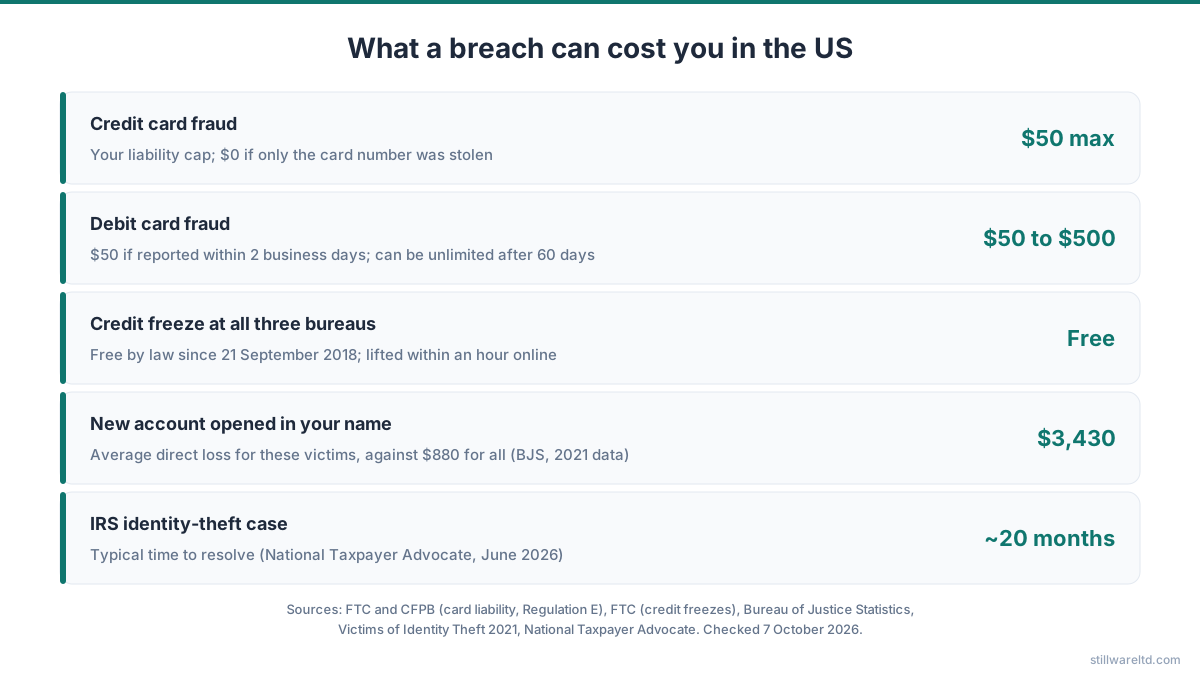
Abstract warnings don’t persuade anyone. Numbers do. Here’s what the main consequences can cost you in the US, using published figures for each line item.
- Card fraud: For a credit card, federal law caps your liability at $50, and at $0 if only the card number was stolen. For a debit card it’s $50 if you report within two business days and up to $500 after that, and it can be unlimited if you wait more than 60 days after your statement. Your bank must investigate a debit dispute within 10 business days, or give you a provisional credit within that time while it takes up to 45 days.
- Credit freeze across the three bureaus: Free by law since 21 September 2018. A bureau must place the freeze within one business day of an online or phone request and lift it within an hour, so the cost is your time each time you apply for credit.
- Tax return fraud remediation: The National Taxpayer Advocate reported in June 2026 that IRS identity-theft cases take about 20 months to resolve, with more than half a million cases pending. Afterwards you’ll want an Identity Protection PIN, which changes every year.
- New account opened in your name: Victims whose information was used to open new accounts lost $3,430 on average in direct losses, against $880 across all identity-theft victims (Bureau of Justice Statistics, 2021 data).
- Time cost: Most cases are quick: in the same survey, 56% of victims spent a day or less sorting things out. But new-account and tax fraud can drag on for months, as the IRS figure above shows.
Stack those against the money you were trying to save by using a “free” budgeting app that may monetize your transaction data through affiliate offers or aggregated spending reports. The math rarely works in your favor.
That’s the specific failure mode that pushed me toward looking at how finance tools could work differently. Many finance apps share a troubling assumption — that your transaction data is theirs to aggregate, sync, and analyze on remote infrastructure. We believe finance tools should work offline by default. Manual entry, or a receipt photo scanned on-device, doesn’t involve anyone else’s server at all.
Why Local-First Is Risk Reduction, Not Paranoia
Data that never leaves your device can’t be in someone else’s breach report. That’s the entire mechanism. It’s not a slogan about freedom or a political stance about surveillance. It’s a simple reduction in the number of places your information physically exists.
A local-first finance tool stores your numbers in a file on hardware you own. If you want a backup, you copy that file to a drive you control — a personal Google Drive folder, an external SSD, a NAS. The point is that no company holds a running copy and no aggregator credential is needed to keep it fresh.
The tradeoff is obvious and worth naming. You type in transactions manually, or you photograph a receipt and let the app extract the total on-device. That’s a few minutes a week. In exchange, no third party ever has a working key to your bank account, and your spending history isn’t a data asset that changes hands when a startup gets acquired.
If you want to go deeper on the discipline this requires, our breakdown of manual expense tracking as a long-term practice lays out the workflow.
This isn’t a new idea. The local-first software movement has been arguing for years that ownership of your own data should be the default, not a premium feature. Finance is just where the stakes are highest, because the downside of a leak involves your actual money rather than your playlist history.
The Questions to Ask Any Finance App Before You Connect
Before you hand any app a bank credential, run through this short list. It takes two minutes and it filters out most of the risky ones.
- Does the app require my bank username and password, or does it use an official OAuth flow with a token I can revoke?
- Does the app work if I turn off Wi-Fi and cellular data?
- Can I export every transaction to a plain CSV or JSON file without contacting support?
- Where does my data physically live — their servers, a cloud I rent, or my own device?
- If the company shut down tomorrow, could I still open my data?
- Does the privacy policy mention selling, sharing, or “anonymizing” transaction data for partners?
The last one matters more than people realize. “Anonymized” transaction data can often be re-identified when combined with timestamps and merchant locations. In a study of three months of credit card records for 1.1 million people, knowing the shop and day of just four purchases was enough to single out 90% of them (de Montjoye and colleagues, Science, 2015).
If you’re tired of running through this checklist every time a new app launches, the underlying philosophy is worth reading in full — see our privacy-first budgeting philosophy for the reasoning behind it.
What to Do This Week If You’re Already Exposed
If your credentials showed up in a data breach — and with Have I Been Pwned alone indexing nearly 18 billion breached accounts, there’s a fair chance they have — here’s the practical sequence.
- Change the password on the affected account and on any account that reused it.
- Turn on app-based two-factor authentication, not SMS.
- Freeze your credit with all three bureaus. It’s free and reversible.
- Check your IRS account and set an identity protection PIN.
- Review your bank statements line by line for 90 days. Small, unfamiliar charges can be test runs.
- Stop reusing passwords across financial accounts. A password manager helps, but only if the vault itself is strong.
None of this is dramatic. It’s maintenance. The same way you change the oil in a car you plan to keep.
The deeper move is to reduce how many copies of your financial life exist at all. A “free” budgeting app that reads your bank through an aggregator is a trade — your transaction data for their service. A paid tool with local storage is a different trade — a small one-time fee for fewer places your information can leak. Both are legitimate choices. Only one shrinks your exposure over time.
Full disclosure: we make Zeroed, an offline budgeting app that takes the manual-entry path. It does zero-based (envelope) budgeting, has an on-device receipt scanner for cash spending, and imports bank statements (CSV, PDF, OFX, QFX or QIF) instead of linking to your bank. There is no account and no bank connection, your data is encrypted with AES-256 on your device, and sync is optional through your own Google Drive. It is $19.99 once at the founder price until 14 February 2027, then $39.99, with a 34-day free trial.
If you want the reasoning behind that design first, read our guide to the local-first approach. It’s a longer read, but it’s the honest version of the argument.
Sources, checked 7 October 2026: LastPass, notice of security incident (22 December 2022) and Krebs on Security on later thefts; Digital Shadows study via GovInfoSecurity (2020); PBS NewsHour on the Target breach and the Virginia Attorney General on the 2017 settlement; Plaid, API progress update (May 2023); Lieff Cabraser on the Plaid settlement; Bloomberg Law on the Finicity lawsuit; CFPB, Personal Financial Data Rights and Cooley on the injunction; FTC, Lost or stolen credit, ATM and debit cards and credit freezes; CFPB, Regulation E §1005.11; National Taxpayer Advocate, June 2026 report to Congress; IRS, Identity Protection PIN; Bureau of Justice Statistics, Victims of Identity Theft, 2021; de Montjoye et al., Unique in the shopping mall (Science, 2015); Have I Been Pwned.