
The Syntax Trap: Why Most “Coding for Kids” Tools Teach the Wrong Thing First
Most coding apps for children are teaching them to be typists, not thinkers. They obsess over semicolons, parentheses, and perfect spelling while the core skill—computational logic—gets lost in a sea of red error messages. The real goal isn’t to produce a junior software engineer; it’s to build a resilient, structured problem-solver. When you start with syntax, you teach kids that coding is about memorizing arcane rules. When you start with logic, you teach them that coding is about creating possibilities. Learning how to teach kids coding logic effectively means flipping this script entirely.
This misalignment explains the frustration. A child can perfectly understand the concept of “if it’s raining, then take an umbrella,” but translating that into if (weather == "rainy") { takeUmbrella(); } introduces a dozen potential failure points that have nothing to do with logic. The cognitive load shifts from creative problem-solving to debugging spelling mistakes.
The industry’s focus on text-based languages as the “real” starting point is a pedagogical error. It turns potential creators into discouraged consumers. After researching dozens of coding apps and platforms, one pattern stands out: nearly all require an internet connection and a login.
This isn’t just an inconvenience; it fundamentally changes the creative process. The tool becomes a service, the child’s work becomes data on a server, and the focus shifts from immediate, tangible creation to waiting for pages to load and accounts to sync. We believe the first coding environment should be as immediate and self-contained as a box of LEGO—no login, no Wi-Fi, just pure building.
5 Unplugged Activities to Build a Logic Foundation
Before a child touches a screen, they already understand complex logical sequences. Your goal is to make that implicit knowledge explicit. Start with these tangible, everyday processes.
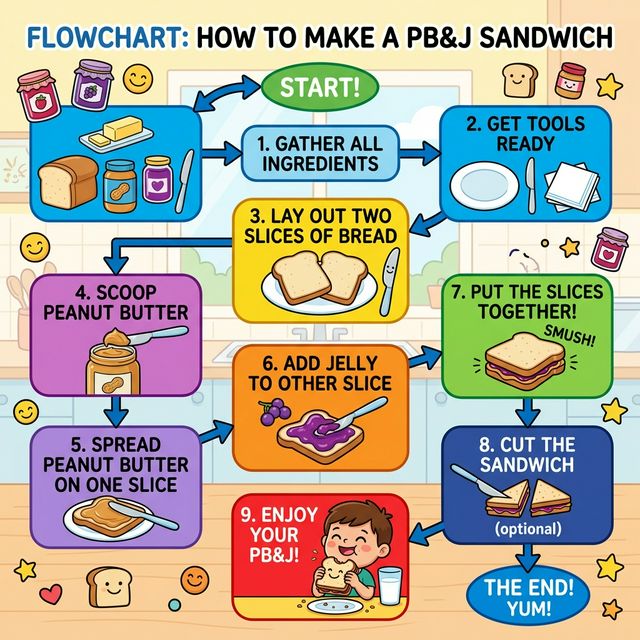
1. The Sandwich Algorithm Making a peanut butter and jelly sandwich is a classic for a reason. Give them a goal and a set of resources: bread, jar, knife, peanut butter, jelly. Watch them try. They will likely put the knife in the jar before getting the bread, or try to spread without opening the lid. Each “bug” is a teachable moment in precise instruction.
Break it down into a step-by-step algorithm:
- Get two slices of bread.
- Open the jar of peanut butter.
- Pick up the knife.
- Insert the knife into the peanut butter jar.
- Spread peanut butter on one slice of bread.
- Repeat steps 2-5 with the jelly and the other slice.
- Press the two slices together.
Now, introduce conditionals. What if we’re out of jelly?
- IF the jelly jar is empty, THEN use honey instead.
- IF the honey is also empty, THEN make a peanut butter-only sandwich.
- IF there is no bread, THEN the algorithm cannot start.
2. Board Game Rule Debugging Play a simple board game, but intentionally introduce a “bug” in the rules. Ask your child to find and fix it.
3. Daily Routine Flowchart Map out the morning routine (wake up, brush teeth, get dressed, eat breakfast) as a visual flowchart on paper.
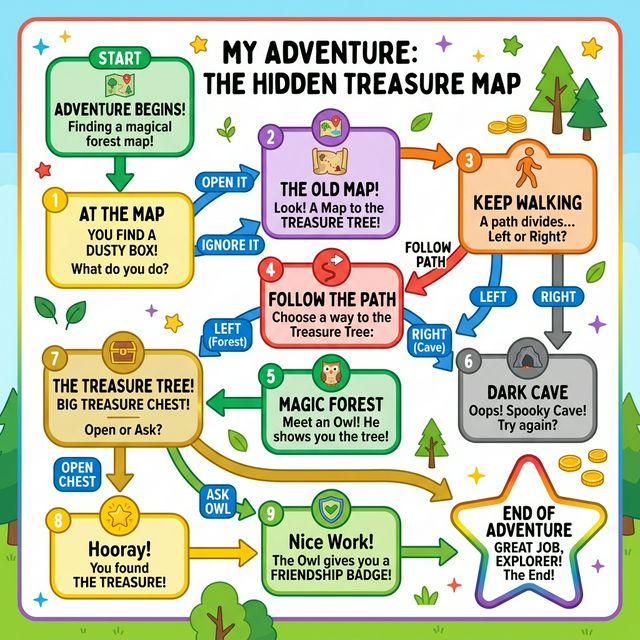
4. Treasure Hunt with Conditions Create a treasure hunt where clues are conditional: “IF you find something red, THEN look under the couch. IF not, check the bookshelf.”
5. Story Sequencing Write story events on index cards and have the child put them in a logical order. Then, add “What if?” cards to change the sequence.
This is programming. It’s sequencing, conditionals, and problem-solving. The transition to a digital tool should scaffold this exact thinking, not replace it with a new, foreign language.
Why Visual, Node-Based Programming Wins for Early Learning
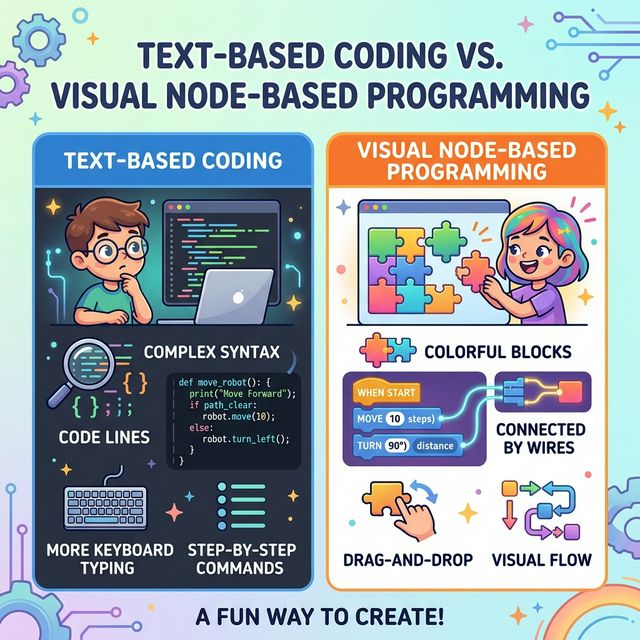
Text-based code is a one-dimensional stream of symbols. Visual, node-based programming is a two-dimensional map of ideas. For a developing mind grappling with abstract logic, the map is infinitely clearer.
Think of it as the difference between writing out assembly instructions for a piece of furniture versus looking at the diagram. The diagram shows relationships, connections, and flow at a glance. A node-based system does the same for logic:
- Boxes represent actions or questions (“Show text”, “Ask for input”, “Check condition”).
- Arrows represent the flow of control (what happens next).
- Connections are made by drawing lines, not by typing cryptic variable names.
This approach eliminates entire categories of discouraging errors. There are no missing semicolons, no misspelled commands, and no mismatched brackets. The child’s mental energy is spent entirely on the structure of their story or game, not on the punctuation of their commands.
The feedback is immediate and visual: if the path doesn’t connect, the story breaks in an obvious way. Debugging becomes a puzzle of “why doesn’t this path work?” rather than “what invisible character did I get wrong?”
Most coding apps in this space share a troubling assumption: that a child’s creative work is best stored on the company’s server. This creates an incentive where the platform’s value is in retaining the user rather than empowering them with true ownership.
A child should be able to build something on a tablet in the backseat of a car with no cellular signal. They should then export a standalone file they can share directly with a friend via AirDrop or a USB stick. The work belongs to them, not to a platform. For more on this philosophy, see our article on why offline-first tools build better creators.
Building Your First “Choose Your Own Adventure”: A Logic Playground
The perfect project for this visual logic is the classic “Choose Your Own Adventure” story. It’s pure conditional logic wrapped in a package of creativity. Here’s how the thinking translates from concept to construction.
First, plan the story map on paper. This is the unplugged algorithm.
- Start: “You find a mysterious door in your backyard. Do you OPEN it or IGNORE it?”
- Branch 1 - OPEN: “The door leads to a glowing tunnel. Go FORWARD or BACK?”
- Branch 2 - IGNORE: “You go inside for lunch. The story ends.”
This map is a flowchart. Now, in a visual tool, each of these steps becomes a node.
A simple node setup would look like this:
- Start Node: Contains the opening text.
- Choice Node: Presents the options “OPEN” and “IGNORE.” It has two output arrows.
- Conditional Paths: The “OPEN” arrow connects to the “glowing tunnel” text node. The “IGNORE” arrow connects to the “story ends” node.
The act of building is the act of connecting these decisions. The child literally draws the path the story can take. To playtest, they don’t compile code; they simply hit “Play” and click their choices, watching the story follow the paths they built.
The instant feedback loop—build, test, tweak—is addictive and educational. The magic happens when they hit a dead end in their own story and have to trace back to find the missing connection, which is the essence of debugging. They learn that logic is about ensuring every possible input has a defined output.
The Problem with Cloud-First Coding Toys (And What to Look For Instead)
The first wave of kids’ coding tools was physical: robots and blocks. The second wave was cloud-based apps and websites. We’re now seeing the limitations of that model, especially for deep, focused learning.
The standard approach goes like this: You download an app or visit a site. You must create a parent account, then a child profile. The child’s projects are saved to the cloud. This seems convenient, but it introduces critical friction and hidden costs.
Key problems with cloud-first tools:
- The Login Wall: The creative impulse is fleeting. “I have an idea!” is met with “Please enter your password.” The moment is gone.
- Internet Dependence: No Wi-Fi on the road? No coding. The activity is suddenly unavailable.
- Ownership Ambiguity: Can the child export their game as a real file they can email to grandma? Or is it trapped inside the app’s ecosystem?
- The Data Question: If it’s free, what is the product? Often, it’s the child’s engagement data and creative output.
A true learning tool should be subservient to the learner’s context, not the other way around. It should work in a basement, on a plane, or in a waiting room, and it should produce something the child can point to and say, “I made this file.”
Look for tools that prioritize offline-first creation. The checklist is simple:
- No Account Required: The app opens directly to a blank canvas.
- Local Storage: Projects save directly to the device’s storage.
- True Export: The final creation can be exported as a standard file (HTML, PDF, PNG).
- Shareable Output: The child can share this file via the device’s native share menu.
This architecture respects the child as a creator, not a data point. It teaches that digital creations are things you own and control, not just experiences you temporarily access.
The Parent’s Guide: Fostering a Coder’s Mindset at Home
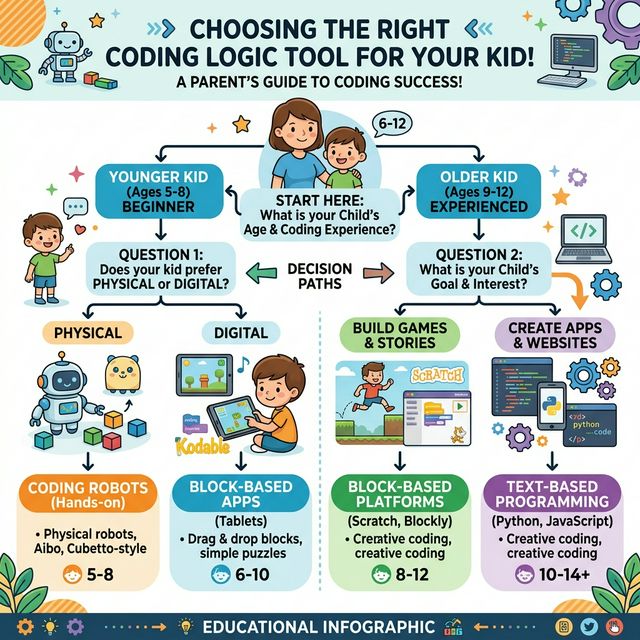
Your role isn’t to be a programming tutor. It’s to be a logic spotter and a project champion. The mindset shift is more valuable than any specific skill.
Spot logic in the wild. When you’re following a recipe, point out the sequence and the conditionals (“IF the sauce is too thick, THEN add a splash of water”). When playing a board game, talk about the rules as an algorithm. This builds the mental framework.
Embrace the bug. When their story game breaks and a choice leads nowhere, resist the urge to fix it. Ask guiding questions instead: “What did you expect to happen when you picked that?” “Can you trace the path from the beginning to see where it stops?” This teaches systematic debugging, a skill far beyond coding.
Celebrate the shareable artifact. The goal isn’t just the learning process; it’s the tangible product. When they export their HTML game file, help them share it. Send it to a relative, load it on the family computer, or host it on a local network. This transforms abstract logic into social, creative currency. They aren’t just learning to code; they’re learning to make things for an audience.
The dual benefit here is profound. The child develops foundational computational thinking—decomposition, pattern recognition, algorithmic design—which underpins mathematics, science, and problem-solving in any field.
You, as a parent, get to replace passive screen time with active, creative production. The screen becomes a workshop, not just a window. The tools you choose send a message. Choose tools that prioritize ownership over access, logic over syntax, and creation over consumption.
The right foundation doesn’t just teach a child how to code a game; it teaches them how to think about systems, a gift that lasts long after the final line of code is written. Ready to move from theory to practice? The best way to learn is by doing. Start with one unplugged activity this week, like the sandwich algorithm or a treasure hunt. Then, explore a visual, node-based tool that lets your child build without barriers. Give it a try and see how quickly they embrace the logic behind the code.