
You’re standing in what used to be your living room. The fire trucks left an hour ago. The water from the hoses has turned the ashes into a gray paste. Your phone has one bar of signal — enough to call your insurance adjuster, but not enough to load a web page. The adjuster asks for a list of everything you lost. This is the moment a home inventory app for insurance claims proves its worth.
Everything.
Brand, model, year purchased, estimated value. For the TV in the corner that’s now a puddle of plastic. For the refrigerator that your grandfather bought in 1982 and still worked. For the bookshelf you built yourself over a pandemic winter.
Most people cannot list everything they own from memory, and it only gets harder after a disaster. There is no precise figure for how much people forget. The point is that memory is a weak record when an insurer asks for detail.
And your insurance claim? The Insurance Information Institute (Triple-I) lists getting a claim settled faster among the reasons to keep a home inventory. Documentation will not guarantee a quick payout, but it removes a common source of delay: not being able to prove what you owned.
That’s the problem a proper home inventory app for insurance claims solves. Not as a nice-to-have. As a way to spend less time arguing about what you owned and more time getting back on your feet.
Why most solutions fail at the exact moment you need them most — and what actually works when the power is out and the towers are down.

The Insurance Claim Reality Check for Your Home Inventory App
Let’s get specific about what happens when you file a claim.
Your insurance policy has two types of coverage for personal property: Actual Cash Value (ACV) and Replacement Cost Value (RCV). ACV pays what your stuff is worth today — after depreciation. RCV pays what it costs to buy it new.
In general, an insurer will want three things before it pays on either:
- Proof you owned the item
- Proof of when you bought it
- Proof of what it was worth
Without documentation, the adjuster has less to work with and the claim is harder to settle in your favour. The adjuster isn’t being cruel — they’re following policy. They can’t write a check for “a Samsung TV” when you might have owned a different brand. They can’t assume you bought a 65-inch when you might have had a 55-inch.
An inventory app that stores serial numbers, purchase dates, and receipts removes much of that ambiguity. Three scans at purchase time. That’s it.
We believe the inventory apps that hold up after a disaster are the ones that don’t require a server to be running. An app that depends on a company staying in business or maintaining a cloud service can become a paperweight at exactly the wrong moment.
Documentation makes a claim easier to settle. Insurance companies process what you can prove, not what you can remember.
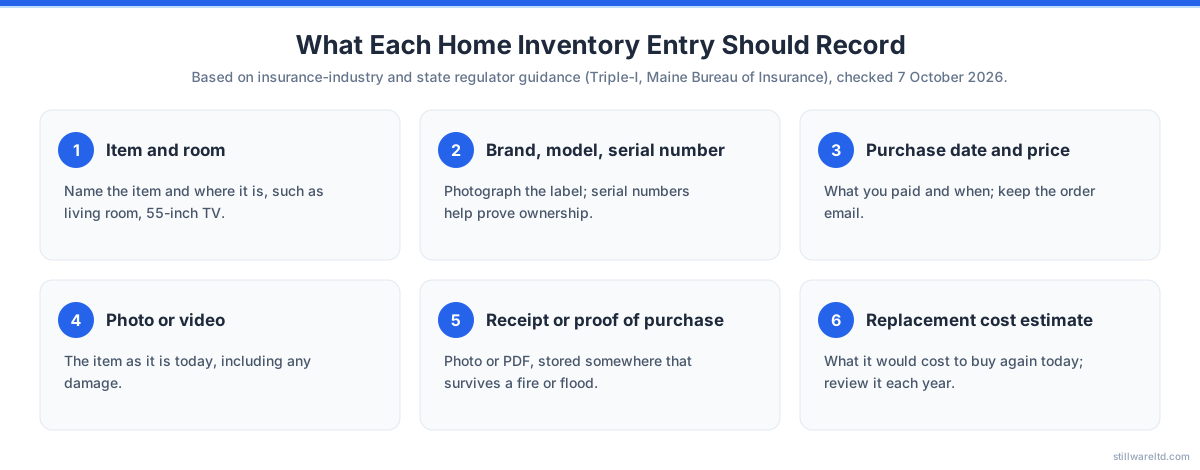
What a Proper Inventory Includes
- Item name and category — electronics, furniture, appliances, clothing, tools
- Brand, model, and serial number — critical for high-value items
- Purchase date and price — receipts are gold
- Estimated current value — for ACV claims
- Photo or video of the item — context matters
Many people skip the serial number. Triple-I and state insurance regulators both tell people to record it. A serial number helps identify the exact item you owned. Without it, you’re relying on memory and guesswork.
Now, here’s the kicker: many inventory apps store this data on a server somewhere. If you cannot get online after a disaster, you may lose access to your own records. That’s not a bug. It’s an architectural choice. Triple-I’s advice is to check that your app backs up your data and that you know how to get it back.

5 Signs Your Home Inventory App Will Fail You
The problem isn’t that people don’t track their belongings. Almost everyone has something — a spreadsheet, a shoebox of receipts, a photo album on their phone. The problem is that these systems fail under pressure.
Here are the five most common failure modes:
-
It’s on paper in the house. Receipts in a drawer. A notebook on a shelf. After a fire or flood, paper is gone. You don’t get a second chance.
-
It’s on a server you don’t control. The app company could go bankrupt, change their pricing model, or delete inactive accounts. Your data vanishes with their business model.
-
There’s no serial numbers. You know you owned “a laptop” but not which model or when you bought it. The adjuster needs specifics. The claim drags.
-
No estimated values. You can remember what you paid for things, but not what they’re worth now. For ACV claims, you need depreciation calculations. Few people can estimate these under pressure.
-
You haven’t updated it in 18 months. The TV you bought last Christmas isn’t listed. The furniture you inherited isn’t listed. Your inventory is a snapshot of a house that no longer exists.
How common is it to have an inventory at all? In a 2023 Triple-I/Munich Re consumer survey, 47 percent of homeowners said they had prepared an inventory of their possessions to help document losses for their insurers.
It is the forgotten items that quietly drop off a claim. For example, that forgotten Bose speaker: a hundred bucks gone. The vacuum you bought three years ago: two hundred. It adds up fast.
If you recognize any of these signs in your current approach, your inventory system needs an upgrade. The good news: fixing it takes an afternoon. The better news: apps now handle some of the tedious parts. The NAIC’s free Home Inventory app, for example, lets you group belongings by category, scan barcodes and export photos.
Building Your Indisputable Insurance Record
Let’s get practical. Here’s a system that works regardless of whether the internet is available.
Step 1: Choose Your Tool
You need software that keeps your data on your device. Period. If you have to sign in to view your inventory, you’re doing it wrong. If the app requires an internet connection to scan a barcode or add an item, it’s the wrong architecture.
In our view, the right tool works fully offline. You scan, you type, you save — and the data lives on your phone. If you want to sync it to another device, you use your own encrypted storage. The app provider never touches your data.
One free option to look at is the NAIC Home Inventory app for iPhone and Android, published by the association of US state insurance regulators. Whichever tool you pick, check its data policy and how you get your records out before you rely on it.
Step 2: Start With The Expensive Stuff
Don’t try to catalog everything at once. That’s how people give up. Start with the items that would cost the most to replace:
- Electronics — TVs, laptops, tablets, phones, gaming consoles
- Major appliances — refrigerator, washer, dryer, oven, dishwasher
- Furniture — sofa, bed, dining table, desk
- Tools — power tools, lawn equipment, workshop gear
- Jewelry and valuables — get appraisals for valuable pieces, and ask your insurer whether jewelry is capped and needs separate cover
For each item, capture four things: a photo, the serial number, the purchase date, and what you paid. If you still have the receipt, photograph it and attach it to the entry. If you don’t, check your email for digital receipts and forward them to yourself.
Step 3: Use a Standardized Category System
A clear structure makes your list easier for an adjuster to check. Organize by room, then by category within each room:
- Living Room: electronics, furniture, decor, lighting
- Kitchen: appliances, cookware, small electronics, tableware
- Bedroom: furniture, clothing, electronics, personal items
- Garage: tools, equipment, vehicles, storage
- Home Office: computer, peripherals, furniture, supplies
Each item gets a room tag and a category tag. When the adjuster asks “what electronics were in your living room,” you can answer in seconds.
Step 4: Print It
Print a full inventory PDF and put it somewhere safe. A fireproof safe. A safety deposit box. Your parents’ house. A location that won’t burn, flood, or get destroyed alongside your home. Triple-I and Ready.gov both advise keeping a copy away from your home, where you can still reach it after a disaster.
The printed PDF doesn’t need to be beautiful. It needs to be legible and complete. Include serial numbers, estimated values, and a thumbnail photo of each item. That single piece of paper may be the copy that survives.
Step 5: Review Quarterly
Set a recurring reminder — every three months works well — to update the inventory. New purchases get added. Old items get removed or marked as sold. Depreciation gets recalculated.
A quarterly review can be short, especially if you add big purchases as you make them, as Triple-I advises. Skipping it means your inventory lags behind reality. And the gap between what you own and what your inventory shows is where claims can get delayed.
The Cost of Not Having a System
Let me be straight about numbers: there is no reliable published figure for how much money people lose by not having an inventory, so we won’t quote one. What we can point to is what the insurance industry and regulators say. Triple-I lists a faster claim settlement, a check that your coverage is high enough, and proof of losses for your tax return among the reasons to keep an inventory.
The cost of starting is small. The NAIC’s Home Inventory app is free, and a spreadsheet costs nothing. Even if you never file a claim, the peace of mind — knowing you could prove what you own — is worth the setup time.
Consider the alternatives:
- A paid cloud app at an example price of $10 a month costs $120 a year, or $600 over five years. For a real-world reference, HomeZada’s Premium plan is listed at $99 a year or $15.95 a month, and its free Essentials plan includes a home inventory (prices checked 7 October 2026).
- You’re still dependent on that company staying in business.
- Their servers must keep running. Their terms of service must not change.
Or you choose a local-first app or a spreadsheet, keep the file on your own device, and back it up to storage you choose. The data is yours. The format is yours. The privacy is yours.
We think the local option sounds better, and it’s the one that still works when the power is out.
The best time to build your home inventory was the day you moved in. The second best time is right now. Before you close this tab, before you get distracted by another notification — take five minutes and start. Pick one room. Catalog one item. That’s enough to break the inertia.

What to Do This Weekend
The window between “I should do this” and “I wish I had done this” is unpredictable. You might go thirty years without needing your home inventory. Or you might need it next month. You don’t get to choose which.
Here’s a one-weekend plan to get it done:
Saturday morning (1 hour): Pick a local-first inventory app or a spreadsheet. Catalog your electronics room by room. Capture serial numbers, photos, and purchase dates. Focus on the items worth over $200.
Saturday afternoon (1 hour): Move to major appliances and furniture. Same process — photo, serial, date, value. Don’t worry about perfection. Done is better than perfect.
Sunday morning (30 minutes): Export your inventory as a PDF. Print two copies. Put one in a fireproof safe. Give one to a trusted family member or put it in a safety deposit box.
Sunday afternoon (15 minutes): Set up quarterly reminders to update the inventory. Add recent purchases. Remove items you’ve sold or given away. This is the maintenance habit that makes the system sustainable.
That’s two and a half hours. Less time than watching a single movie. And it could save you a lot of time and stress if you ever need to make a claim.
The tools exist. The method is simple. The only missing piece is the decision to start.
If you rent rather than own, our guide to a home inventory app for renters insurance covers what is different for tenants. For the upkeep side of owning a home, see our home maintenance log guide. For the claims process itself, Triple-I’s guide to settling claims after a disaster says to give the adjuster a copy of your inventory of damaged items along with copies of receipts, and notes that most policies require claims to be filed within one year of the disaster, so check the deadline in yours.
Or just open your current system — whatever it is — and add one item. One serial number. One photo. That’s progress. That’s proof. That’s the beginning of an indisputable record.
Sources: Triple-I, How to create a home inventory; Triple-I, Facts + Statistics: Homeowners and renters insurance (2023 Triple-I/Munich Re Consumer Survey); Triple-I, Settling insurance claims after a disaster; Ready.gov, Document and Insure Your Property; NAIC Home Inventory app, Wisconsin Office of the Commissioner of Insurance and Maine Bureau of Insurance, Taking a Home Inventory; HomeZada, pricing (checked 7 October 2026).