The short answer: the best gamified chore tracker for kids with no subscription depends on your phone. On iPhone and iPad, SimplChores ($1.99 once) and iAllowance ($2.99 once) are the pay-once options we found. On any device, OurHome and Habitica are free to use, and a paper chart is free forever. Prices checked 7 October 2026.
You buy a chore tracker app hoping it’ll stop the nightly arguments about dishes. Two months later, you’re paying a monthly fee and the app has more upsells than your kid has completed chores.
That’s the trap many parents fall into. They see “free trial” and don’t calculate the five-year cost of yet another subscription.
We looked at the gamified chore tracker for kids no subscription market, specifically apps that don’t charge monthly fees, and read each app’s own pricing and store pages on 7 October 2026. We did not hands-on test every app, so treat the notes below as what the vendors state, not as a lab review. Here’s what we found, what’s worth using, and what to watch for.

What Parents Actually Need From a Gamified Chore Tracker for Kids
Most chore apps on the market do the same thing: let you assign tasks, track completion, and optionally tie rewards to allowance. The problem isn’t the concept — it’s often the business model.
The core conflict is simple: your child’s motivation system shouldn’t be someone else’s revenue stream.
Many of the best-known chore trackers charge a subscription. BusyKid lists $4 a month billed annually, Greenlight’s Core plan is $5.99 a month, and Homey’s paid plans on the US App Store are $6.99 a month or $59.99 a year. Others are free with optional in-app purchases, and a few small apps charge once.
Here’s what parents actually need from a chore app:
- Kids can see their tasks without needing a data connection
- No ads interrupting the experience
- Data stays private — not sold to marketing companies
- One payment, done forever
- Actually motivates kids (points, streaks and RPG mechanics work well here)
Check the price and the privacy label before you commit, because the answers differ a lot from app to app.
We believe chore apps should work offline by default. Here’s why: kids use tablets in cars, on airplanes, in the yard. A chore app that requires an internet connection to mark “made the bed” as complete fails in the real world.
Quick Verdict: Which Chore Tracker Should You Use?
Before we dive into the details, here’s the short answer:
Best overall (no subscription, offline): A pen-and-paper chart with magnets. Seriously. It never crashes, requires zero setup, and costs a few dollars at a craft store.
Best digital option (no subscription): SimplChores on iPhone and iPad. It costs $1.99 once, and its App Store listing says: no subscriptions, no in-app upsells, 100% offline, no account, no tracking, no ads. Kids earn 10 points per task, unlock 11 achievement badges and build streaks.
Best dedicated kid experience (free): OurHome. It is listed as free with optional in-app purchases and has a points-and-rewards system for kids. Read the privacy label in your store before you sign the family up.
Best if you’re willing to pay once: iAllowance ($2.99 once on iPhone, iPad and Mac) if you also want allowance tracking in stars, money or time. Android families have fewer pay-once options, and we could not verify a pay-once, RPG-style chore tracker on Android.
The 7 options without a subscription
| Option | What you pay (checked 7 Oct 2026) | Platforms | Game mechanics |
|---|---|---|---|
| OurHome | Free, optional in-app purchases | iPhone, Android | Points and rewards |
| Habitica | Free; optional subscription from $4.99/month | iPhone, Android, web | RPG avatar, quests, rewards |
| Homey (free tier) | Free to download; unlimited family members and bank transfers need a paid plan ($6.99/month or $59.99/year on the US App Store) | iPhone, Android | Chore and allowance tracking |
| Rooster Money (UK) | Free “Virtual Tracker”; the card plan is £1.99/month or £19.99/year | iPhone, Android | Star and reward charts |
| SimplChores | $1.99 once | iPhone, iPad | Points, badges, streaks |
| iAllowance | $2.99 once | iPhone, iPad, Mac | Stars or money for chores |
| A printed chart | A few dollars once; ChoreMonster’s website now offers free printable charts | None | Stickers and magnets (DIY) |
The honest summary: there is no big-name, cross-platform, pay-once RPG chore tracker. What exists are small pay-once apps (mostly Apple-only), free apps with optional purchases, and subscription apps that bundle real-money features.

Feature-by-Feature Comparison of Chore Trackers
This is where things get interesting. Most chore trackers look similar on the surface — assign chores, check them off, earn rewards. But the details matter.
Task Management & Customization
OurHome is built for the whole household. Its listing describes tasks you can assign to one person, to several people or on a rotating basis, plus a shared grocery list and a family calendar.
SimplChores and iAllowance keep it simple. SimplChores lets you create custom chores with emojis and daily, weekly or monthly schedules. iAllowance tracks chores and allowances, supports real money, stars or time-based rewards, and can keep several “banks” per child.
BusyKid is the most rigid, because it is a banking product. Parents set chores, kids complete them, and allowance is paid out by direct deposit each Friday into spend, save, donate and invest buckets, with an optional Visa prepaid card (issued by Pathward). That is fine if you want to teach money management, but it is not a game.
The paper chart is infinitely flexible but requires parent effort to set up and maintain.
Gamification & Motivation Mechanics
Every chore tracker claims to be “gamified.” Most of them mean “there’s a progress bar.”
Real gamification in chore apps requires agency, not just animations. Kids need to feel like they’re playing a game, not being surveilled.
- Points, badges and streaks: SimplChores (10 points per task, 11 badges, streaks) and OurHome (points and rewards).
- Full RPG: Habitica turns tasks into an RPG with an avatar, quests and rewards. It is a general habit app rather than a children’s product, so it suits older kids and teens, with a parent setting it up. Its free version has no ads, and the optional subscription is $4.99 a month or $47.99 a year.
- Allowance and stars: iAllowance (stars, money or time) and Rooster Money (star and reward charts).
- Boss battles: none of the apps above has them. If you want boss battles, a printable chart and a good story from a parent is still the cheapest way to get them.
ChoreMonster, the character-based app this page used to compare, is listed as discontinued by AlternativeTo, and its website now offers free printable charts rather than an app. It used to cost $4.99 a month, which is a good reminder of the risk of renting your family’s routine from one company.
Most productivity apps share a troubling assumption about user data: that parents will tolerate telemetry and ads in exchange for “free” features. Children’s data is specially protected in many places (COPPA in the US, the GDPR and the UK Children’s Code in Europe and the UK), so read the privacy label of any app your child uses.
Pricing Deep Dive: The 5-Year Cost of Chore Tracking
This is where subscriptions quietly drain family budgets. Let’s do the math. Prices checked 7 October 2026, US dollars unless noted, before tax.
| App | Price | 5-Year Cost | Model |
|---|---|---|---|
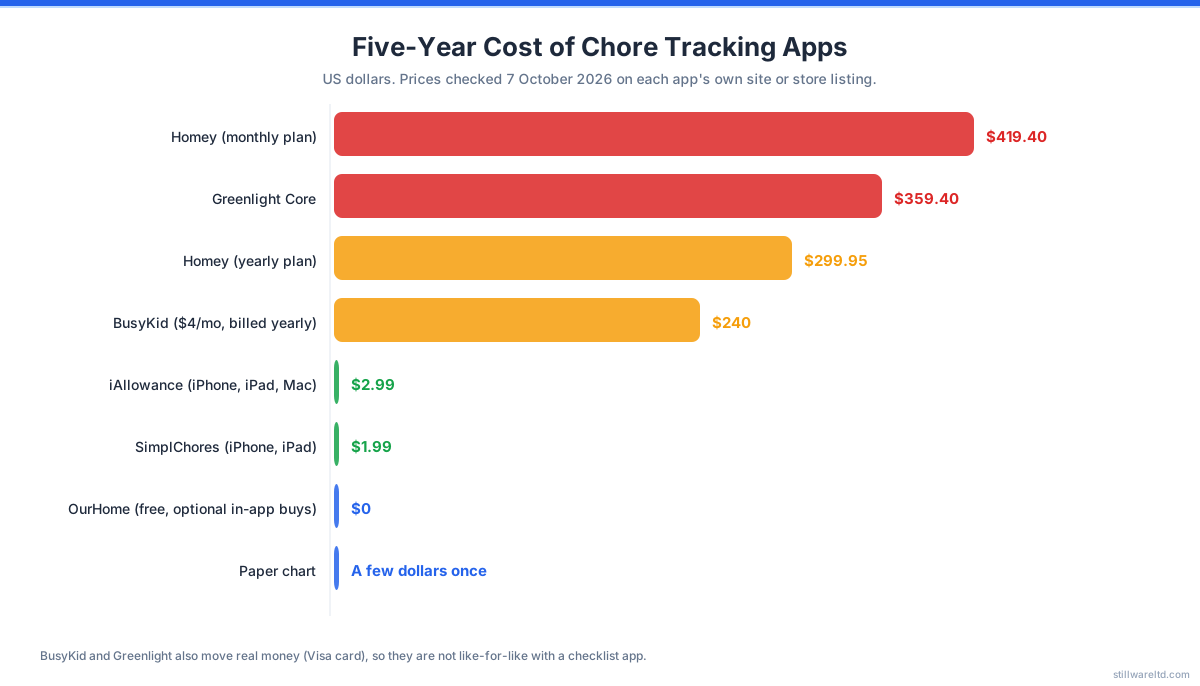
| Homey | $6.99/month or $59.99/year (US App Store) | $299.95 on the yearly plan, $419.40 monthly | Subscription for the full app |
| Greenlight Core | $5.99/month for the family | $359.40 | Subscription (includes a debit card for up to 5 kids) |
| BusyKid | $4/month, billed annually | $240 (plus any card fees) | Subscription (moves real money) |
| iAllowance | $2.99 | $2.99 | One-time |
| SimplChores | $1.99 | $1.99 | One-time |
| OurHome | $0, optional in-app purchases | $0 | Free |
| Paper chart | A few dollars | A few dollars | One-time |
Notice the pattern: the subscription apps cost $240 to $420 over five years, and the pay-once apps cost less than a coffee. BusyKid and Greenlight also move real money and issue cards, so they are not like-for-like with a checklist app, but if all you need is a chore list with rewards, you are paying for features you may not use.
BusyKid at $4 a month (billed annually) is the cheapest US subscription in that table. That’s $240 over five years for a chore list that also pays real allowance, offers a Visa card and lets kids practise investing. Is that worth it? Depends on whether you want those features.
Homey’s yearly plan comes to about $300 over five years. For that money, you could buy a set of magnetic chore charts, a laminator, a pack of dry-erase markers, and still have change for ice cream.
The cheapest options that actually work are the small pay-once apps and the free ones. But “works” depends on your definition. Free apps with in-app purchases may nudge you to upgrade, and small independent apps may not be maintained for ever. For privacy-conscious families, an app that works fully offline with no account (as SimplChores’s listing states) is the simplest answer.
Privacy & Data Handling: What Chore Apps Know About Your Kids
Most parents don’t think about data privacy when downloading a gamified chore tracker for kids no subscription. They should.
Any chore app with a cloud backend can know:
- Your child’s name (or username)
- Their daily routines and household patterns
- When they’re home vs. at school
- Their screen time patterns (based on when they check items)
- Their relationship with parents (from reward systems)
Most of that is harmless in your own household, but it sits on someone else’s server, so it is worth knowing where it goes. Here is what the store listings say, checked 7 October 2026:
| App | What its store listing or site says about data |
|---|---|
| SimplChores | ”100% offline. No account required. No tracking, no ads, no data collection.” |
| Habitica | ”Your tasks are private and we don’t sell your personal data to third parties.” It collects contact info, usage data and diagnostics linked to your identity. |
| Homey | The App Store privacy label lists contact info, photos/videos and user IDs linked to identity, plus analytics. |
| iAllowance | The developer has not given Apple privacy details; it points to a privacy policy on its own site. |
| BusyKid | Issues a prepaid card through a bank partner (Pathward), so a financial-services relationship comes with it. |
| Paper chart | Your kitchen. No account. |
Most chore apps ask for an email to create an account. Every cloud-chore app creates a data trail that follows your child, so choose one whose privacy label you are comfortable with. For a practical walkthrough, see our parent’s guide to protecting kids’ data online.
The paper chart? It knows nothing. Zero telemetry. Zero data collection. Zero account creation. It works perfectly in the dark during a power outage.
Who Should Choose What: Scenario-Based Recommendations
Choose BusyKid if:
Your primary goal is teaching financial responsibility. BusyKid ties chores directly to allowance, offers a Visa prepaid card with parent monitoring, and teaches real money management. The trade-off: no game mechanics, and a subscription ($4 a month billed annually).
Choose OurHome if:
You want a free digital solution for the whole household, with points and rewards for the kids. Check the in-app purchase options and the privacy label first.
Choose SimplChores or iAllowance if:
You use iPhones or iPads and want to pay once. SimplChores is the more game-like (points, badges, streaks, fully offline). iAllowance is the better fit if you want a real or virtual allowance ledger as well.
Choose Habitica if:
Your kid is older and likes RPGs. It is free, and you can add chores as tasks, though it was not built as a family chore app.
Choose a paper chart if:
You value privacy, offline reliability, and zero ongoing cost. Paper charts teach the same lessons as digital apps — planning, consistency, delayed gratification — without the privacy tax. The setup takes fifteen minutes and it never needs a software update.
Questions to Ask Yourself Before Choosing a Chore Tracker
Before downloading anything, answer these four questions:
1. Does my kid actually need an app? Many kids respond better to physical charts. Placing a physical sticker or checking a paper list is more tactile than tapping a screen. Digital is convenient; physical is often more effective for younger children.
2. Am I okay with my family’s data being shared? Read the privacy policy. If the app collects analytics data, assumes tracking is acceptable, or shares data with third parties, your family’s routines become part of someone else’s dataset. Choose an app whose privacy label you are comfortable with.
3. What’s my actual budget over the next 3 years? $4 a month sounds cheap. $240 over five years sounds different. Calculate the total cost before committing.
4. Will my kid use it offline? If your child takes a tablet to school, on trips, or to Grandma’s house, an offline-capable app is essential. Many chore apps need an account and a connection; SimplChores and iAllowance (iOS) are the offline-friendly ones we found.

What the Chore App Market Is Missing
We keep an eye on the productivity app space, and after checking these apps, here’s the picture: there is still a gap between the big subscription apps and the small pay-once ones.
The market is split between:
- Free or freemium apps that make money from optional purchases (OurHome, Habitica, Homey’s free tier)
- Subscription apps with real-money features (BusyKid, Greenlight) or full-family plans (Homey)
- Small pay-once apps that are offline and private but mostly Apple-only (SimplChores, iAllowance)
Most productivity apps — in any category — assume users will accept ongoing payments. The chore app space is particularly awkward because the target users are children, and parents are paying monthly for basic checklist software.
What we did not find on 7 October 2026 is a cross-platform, pay-once, offline chore tracker with deeper RPG mechanics, where the child acts as Game Master: designing their own quests, assigning XP values, building a reward shop. The best engagement comes from ownership, not from a pre-made system, and that is the kind of app we would like parents to be able to buy once.
What to Do Right Now
If you need a chore system today, here’s the path of least resistance:
Start with paper. Buy a dry-erase board, some magnets, and a pack of stickers. Set up chore slots, define rewards, and let your kid track their own progress. This costs under $10 and teaches exactly the same skills as any app.
Try SimplChores or OurHome if you want a digital version. SimplChores is $1.99 once on iPhone and iPad; OurHome is free on iPhone and Android. Check the privacy label first.
Avoid subscriptions unless you’ve calculated the 5-year cost and are certain your kid will use the app that long. Engagement with any chore system tends to drop after the first weeks, so start with something cheap.
Watch for offline-first, one-time-purchase options on Android to enter the market. The technology to build them exists — local storage, no telemetry, no accounts. The market just hasn’t delivered a verified one yet.
For more recommendations, read our guide to creative apps that turn screen time into skill building.
Ready to explore your options? Read why we think software you buy once beats software you rent, and what local-first software means for your family’s data.
If you are also choosing apps for your child’s screen time, RankUp Chess is our offline chess academy for kids: free to play, one payment unlocks everything, no ads and no subscription.
The household chore is the original productivity system. Before apps, before notifications, before cloud sync, there was a chart on the refrigerator and a marker. That system taught millions of kids responsibility without tracking a single data point. Maybe the best “app” is the one that doesn’t need one.
Sources, all checked 7 October 2026: BusyKid pricing and home page, Greenlight plans, Homey on the App Store, SimplChores on the App Store, iAllowance on the App Store, Habitica on the App Store, Rooster Money pricing, OurHome, ChoreMonster and AlternativeTo’s ChoreMonster listing.